Blueskyのポスト埋め込み機能を自分でつくる
本記事はBluesky / ATProtocol Advent Calendar 2025 19日目の記事です。
ヤマツと申します。本記事はBlueskyのポスト埋め込み機能を自分でつくる記録です。PHPを利用しています。
以降の内容は、本記事公開時点でBluesky公式に固定されているこちらのポストで行っています。
実装デモと埋め込みコードの概要
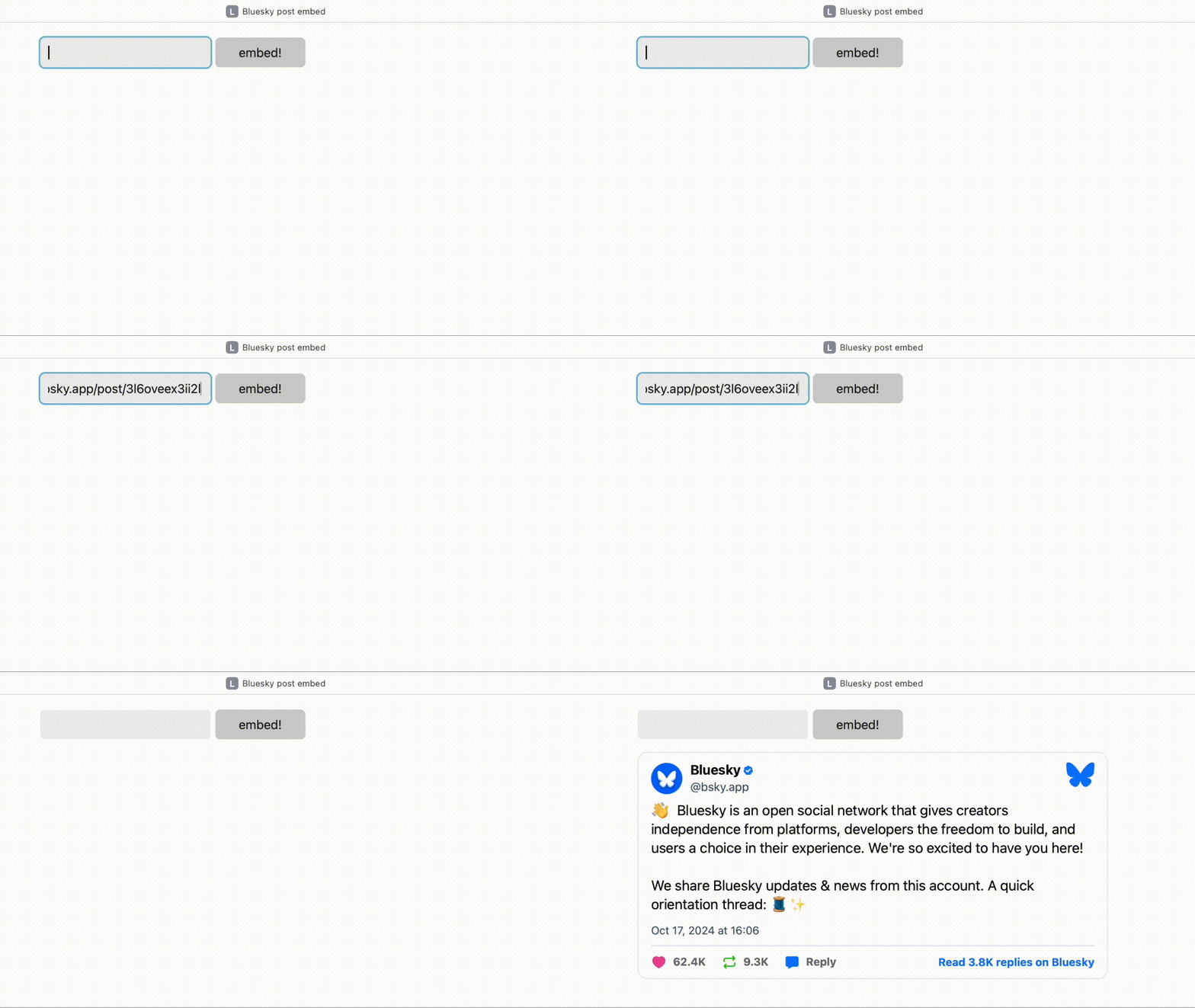
Blueskyの個別ポストURLを入力して、埋め込みコードを生成、表示するというものです(動画の録画と編集が苦手…)
Blueskyの埋め込みコードは以下のようにblockquote要素で構成されています。
<blockquote class="bluesky-embed" data-bluesky-uri="at://did:plc:z72i7hdynmk6r22z27h6tvur/app.bsky.feed.post/3l6oveex3ii2l" data-bluesky-cid="bafyreicnt42y6vo6pfpvyro234ac4o6ijug6adwwrh7awflgrqlt4zibxq" data-bluesky-embed-color-mode="system"><p lang="en">👋 Bluesky is an open social network that gives creators independence from platforms, developers the freedom to build, and users a choice in their experience. We're so excited to have you here!
We share Bluesky updates & news from this account. A quick orientation thread: 🧵✨</p>— Bluesky (<a href="https://bsky.app/profile/did:plc:z72i7hdynmk6r22z27h6tvur?ref_src=embed">@bsky.app</a>) <a href="https://bsky.app/profile/did:plc:z72i7hdynmk6r22z27h6tvur/post/3l6oveex3ii2l?ref_src=embed">2024年10月17日 16:06</a></blockquote><script async src="https://embed.bsky.app/static/embed.js" charset="utf-8"></script>blockquote要素内の属性値や本文は、APIを使って取得します。
事前準備
事前に以下を取得しておきます
- Blueskyのアプリパスワード(APIキー)
- Composerでphpdotenvをインストール
- ComposerはMacだとHomebrewで入れるのが手っ取り早いかと
.envファイルに以下を入力して保存
ID='Blueskyのアカウント'API='アプリパスワード'フォーム部分HTML
実際に使用する場合はCSRF対策を行うのですが、本記事のコードではいったん割愛します。
<form action="" method="post"> <input type="text" name="url"> <button type="submit" name="embed">embed!</button></form>処理部分PHP
埋め込みポスト用の情報を取得していきます。
BlueskyアカウントのDID情報を取得する
Blueskyの基盤技術であるAT Protocolでは、ユーザーの識別情報としてDIDが使われています。DIDはアカウント固有のものであり、アカウント名を変更したり独自ドメインを割り当てたとしても、DIDは変化しません。
DIDについてはこのアドベントカレンダーの1日目、桃色豆腐さんの以下の記事に詳しいです。
以下はアカウントのDID情報を取得するための関数です。com.atproto.identity.resolveHandleを叩いて取得します。
/** * BlueskyアカウントのDIDを取得 */function BlueskyDid($bsky_handle) {  $query_url = "https://bsky.social/xrpc/com.atproto.identity.resolveHandle?handle={$bsky_handle}";  $ch = curl_init($query_url);  curl_setopt($ch, CURLOPT_RETURNTRANSFER, true);  curl_setopt($ch, CURLOPT_HTTPHEADER, ['Content-Type: application/json']);  curl_setopt($ch, CURLOPT_TIMEOUT, 5);  curl_setopt($ch, CURLOPT_FAILONERROR, true);
  $result = curl_exec($ch);  curl_close($ch);
return $result;}以下はBlueskyDid('bsky.app')で取得した結果です。
{"did":"did:plc:z72i7hdynmk6r22z27h6tvur"}この情報はアプリパスワード要らずで、以下のURLでブラウザ上でも取得可能です。
https://bsky.social/xrpc/com.atproto.identity.resolveHandle?handle=[Blueskyのアカウント名]参考情報
アクセストークンを取得する
埋め込みポストの情報を取得するための前段階として、アクセストークンを取得します。この取得には、Blueskyのアプリパスワードが必要です。
アクセストークンはcom.atproto.server.createSessionを叩いて取得します。
//phpdotenvrequire __DIR__. '/vendor/autoload.php';use Dotenv\Dotenv;$dotenv = Dotenv::createImmutable(__DIR__);$dotenv->load();
/** * アクセストークンの取得 */function getBlueskyAccessToken($identifier, $password) {  $login_url = 'https://bsky.social/xrpc/com.atproto.server.createSession';  $data = [    'identifier' => $identifier,    'password' => $password  ];
  $ch = curl_init($login_url);  curl_setopt($ch, CURLOPT_RETURNTRANSFER, true);  curl_setopt($ch, CURLOPT_POST, true);  curl_setopt($ch, CURLOPT_POSTFIELDS, json_encode($data));  curl_setopt($ch, CURLOPT_HTTPHEADER, ['Content-Type: application/json']);  curl_setopt($ch, CURLOPT_TIMEOUT, 5);  curl_setopt($ch, CURLOPT_FAILONERROR, true);  $response = curl_exec($ch);  curl_close($ch);
  $session = json_decode($response, true);  return $session['accessJwt'] ?? null;}
getBlueskyAccessToken($_ENV['ID'], $_ENV['API'])でアクセストークンを取得できます。
参考情報
ポスト情報を取得する
準備が整ったので、いよいよポスト情報を取得します。
/** * postを取得 */function getBlueskyPost($token, $api_url) {  $ch = curl_init($api_url);  curl_setopt($ch, CURLOPT_RETURNTRANSFER, true);  curl_setopt($ch, CURLOPT_HTTPHEADER, ["Authorization: Bearer {$token}"]);  curl_setopt($ch, CURLOPT_TIMEOUT, 5);  curl_setopt($ch, CURLOPT_FAILONERROR, true);
  $result = curl_exec($ch);  curl_close($ch);
return $result;}$tokenは上記のアクセストークン(getBlueskyAccessToken($_ENV['ID'], $_ENV['API']))です。
$api_urlは以下の要領で取得します。app.bsky.feed.getPostsを叩きます。
$account = BlueskyDid('[Blueskyのアカウント]');$account_data = json_decode($account, true) ?: [];
$api_url = "https://bsky.social/xrpc/app.bsky.feed.getPosts?uris=at://{$account_data['did']}/app.bsky.feed.post/[ポストID]";[ポストID]のみを取得するAPIがないので(見落としてるだけかもしれない…)、実装ではフォームに入力されたURLから正規表現を使って抜き出します。[Blueskyのアカウント]も同様にURLから抜き出します。
$url = '[ポストURL]'; //ここではhttps://bsky.app/profile/bsky.app/post/3l6oveex3ii2lを代入preg_match('/https:\/\/bsky\.app\/profile\/(.+)\/post\/(.+)/', $url, $match);
/* var_dump($match) 結果array(3) { [0]=> string(52) "https://bsky.app/profile/bsky.app/post/3l6oveex3ii2l" [1]=> string(8) "bsky.app" [2]=> string(13) "3l6oveex3ii2l"}*/それぞれBlueskyDid($match[1])、https://bsky.social/xrpc/app.bsky.feed.getPosts?uris=at://{$account_data['did']}/app.bsky.feed.post/{$match[2]}とします。
getBlueskyPost(getBlueskyAccessToken($_ENV['ID'], $_ENV['API']), $api_url)でポストの情報を取得します。JSON形式で返ってくるので、json_decode()でデコードします。以下はvar_dump()したものです。
array(1) {  ["posts"]=>  array(1) {    [0]=>    array(12) {      ["uri"]=>      string(70) "at://did:plc:z72i7hdynmk6r22z27h6tvur/app.bsky.feed.post/3l6oveex3ii2l"      ["cid"]=>      string(59) "bafyreicnt42y6vo6pfpvyro234ac4o6ijug6adwwrh7awflgrqlt4zibxq"      ["author"]=>      array(9) {        ["did"]=>        string(32) "did:plc:z72i7hdynmk6r22z27h6tvur"        ["handle"]=>        string(8) "bsky.app"        ["displayName"]=>        string(7) "Bluesky"        ["avatar"]=>        string(135) "https://cdn.bsky.app/img/avatar/plain/did:plc:z72i7hdynmk6r22z27h6tvur/bafkreihwihm6kpd6zuwhhlro75p5qks5qtrcu55jp3gddbfjsieiv7wuka@jpeg"        ["associated"]=>        array(2) {          ["chat"]=>          array(1) {            ["allowIncoming"]=>            string(4) "none"          }          ["activitySubscription"]=>          array(1) {            ["allowSubscriptions"]=>            string(9) "followers"          }        }        ["viewer"]=>        array(2) {          ["muted"]=>          bool(false)          ["blockedBy"]=>          bool(false)        }        ["labels"]=>        array(0) {        }        ["createdAt"]=>        string(24) "2023-04-12T04:53:57.057Z"        ["verification"]=>        array(3) {          ["verifications"]=>          array(0) {          }          ["verifiedStatus"]=>          string(4) "none"          ["trustedVerifierStatus"]=>          string(5) "valid"        }      }      ["record"]=>      array(4) {        ["$type"]=>        string(18) "app.bsky.feed.post"        ["createdAt"]=>        string(24) "2024-10-17T07:06:51.491Z"        ["langs"]=>        array(1) {          [0]=>          string(2) "en"        }        ["text"]=>        string(285) "👋  Bluesky is an open social network that gives creators independence from platforms, developers the freedom to build, and users a choice in their experience. We're so excited to have you here!
We share Bluesky updates & news from this account. A quick orientation thread: 🧵✨"      }      ["bookmarkCount"]=>      int(106)      ["replyCount"]=>      int(3856)      ["repostCount"]=>      int(9340)      ["likeCount"]=>      int(62456)      ["quoteCount"]=>      int(668)      ["indexedAt"]=>      string(24) "2024-10-17T07:06:51.491Z"      ["viewer"]=>      array(3) {        ["bookmarked"]=>        bool(false)        ["threadMuted"]=>        bool(false)        ["embeddingDisabled"]=>        bool(false)      }      ["labels"]=>      array(0) {      }    }  }}
参考情報
埋め込み用HTMLを生成する
ポストの情報も取得できたので、最後に埋め込みコードを生成します。$post_data = json_decode($post, true) ?: [];までは先のコードと同じです。
/** * 埋め込み生成 */$url = 'https://bsky.app/profile/bsky.app/post/3l6oveex3ii2l';preg_match('/https:\/\/bsky\.app\/profile\/(.+)\/post\/(.+)/', $url, $match);
$account = BlueskyDid($match[1]);$account_data = json_decode($account, true) ?: [];
$api_url = "https://bsky.social/xrpc/app.bsky.feed.getPosts?uris=at://{$account_data['did']}/app.bsky.feed.post/{$match[2]}";$token = getBlueskyAccessToken($_ENV['ID'], $_ENV['API']);$post = getBlueskyPost($token, $api_url);$post_data = json_decode($post, true) ?: [];
//日付変換 UTC->JST$post_date = new DateTime($post_data['posts'][0]['record']['createdAt']);$post_date->setTimeZone(new DateTimeZone('Asia/Tokyo'));
$bluesky_embed = <<<EOT<blockquote class="bluesky-embed" data-bluesky-uri="{$post_data['posts'][0]['uri']}" data-bluesky-cid="{$post_data['posts'][0]['cid']}" data-bluesky-embed-color-mode="system"><p lang="{$post_data['posts'][0]['record']['langs'][0]}">{$post_data['posts'][0]['record']['text']}<br><br><a href="https://bsky.app/profile/{$post_data['posts'][0]['author']['did']}/post/{$match[2]}?ref_src=embed">[image or embed]</a></p>— {$post_data['posts'][0]['author']['displayName']} (<a href="https://bsky.app/profile/{$post_data['posts'][0]['author']['did']}?ref_src=embed">@{$post_data['posts'][0]['author']['handle']}</a>) <a href="https://bsky.app/profile/{$post_data['posts'][0]['author']['did']}/post/{$match[2]}?ref_src=embed">{$post_date->format('Y年n月j日 G:i')}</a></blockquote><script async src="https://embed.bsky.app/static/embed.js" charset="utf-8"></script>EOT;
echo $bluesky_embed;ポスト情報の日付はUTCで提供されるので、JSTに変換します。あとはもとの埋め込みコードを見ながら必要箇所を$post_data['posts'][0]...に書き換えていきます。echo $bluesky_embed;で埋め込みポストを表示させます。
埋め込み機能の自作については以上です。
おわりに
X(Twitter)の埋め込み自作は中身の出力をほぼscriptで読み込んでるリソースがやってくれていたので、ある程度同じようにできるだろうと思っていたらほぼ全部自分で取得しなければならなかったので、結構面食らいました(笑)
テキストのみならず、URL付きだったりサムネイルが埋め込まれるタイプ(OGP取得)のポストも上記コードで表示してくれるので、このあたりがscriptのリソースでやってくれてるのかなと思ってたり。個人的には日付の表記も言語に合わせてほしいな…とか思ってます(日本語表記にしてるけど、英語表記に変わってしまうので)
最後にフォーム入力に対応&class化した全体コードを置いておきます。
ここまで読んでいただきありがとうございました。
付録:フォーム入力&class化した全体コード
<?php session_start();
//phpdotenv require __DIR__. '/vendor/autoload.php'; use Dotenv\Dotenv; $dotenv = Dotenv::createImmutable(__DIR__); $dotenv->load();
//CSRFトークン生成 function generateToken() { return bin2hex(random_bytes(32)); }
//CSRFトークン検証 function validateToken($token) { //送信されてきた$tokenが生成したハッシュと一致するか return isset($_SESSION['token']) && hash_equals($_SESSION['token'], $token); }
//XSS対策 function h($str) { return htmlspecialchars($str, ENT_QUOTES, 'UTF-8'); }
//token生成 if (empty($_SESSION['token'])) { $_SESSION['token'] = generateToken(); } $token = $_SESSION['token'];
class blueskyPostEmbed { private $id; private $api;
public function __construct($id, $api) { //初期処理 $this->id = $id; $this->api = $api; }
/** * BlueskyアカウントのDIDを取得 */ public function BlueskyDid($bsky_handle) { $query_url = "https://bsky.social/xrpc/com.atproto.identity.resolveHandle?handle={$bsky_handle}"; $ch = curl_init($query_url); curl_setopt($ch, CURLOPT_RETURNTRANSFER, true); curl_setopt($ch, CURLOPT_HTTPHEADER, ['Content-Type: application/json']); curl_setopt($ch, CURLOPT_TIMEOUT, 5); curl_setopt($ch, CURLOPT_FAILONERROR, true);
$result = curl_exec($ch); curl_close($ch);
return $result; }
/** * アクセストークンの取得 */ public function getBlueskyAccessToken() { $login_url = 'https://bsky.social/xrpc/com.atproto.server.createSession'; $data = [ 'identifier' => $this->id, 'password' => $this->api ];
$ch = curl_init($login_url); curl_setopt($ch, CURLOPT_RETURNTRANSFER, true); curl_setopt($ch, CURLOPT_POST, true); curl_setopt($ch, CURLOPT_POSTFIELDS, json_encode($data)); curl_setopt($ch, CURLOPT_HTTPHEADER, ['Content-Type: application/json']); curl_setopt($ch, CURLOPT_TIMEOUT, 5); curl_setopt($ch, CURLOPT_FAILONERROR, true); $response = curl_exec($ch); curl_close($ch);
$session = json_decode($response, true); return $session['accessJwt'] ?? null; }
/** * postを取得 */ public function getBlueskyPost($token, $api_url) { $ch = curl_init($api_url); curl_setopt($ch, CURLOPT_RETURNTRANSFER, true); curl_setopt($ch, CURLOPT_HTTPHEADER, ["Authorization: Bearer {$token}"]); curl_setopt($ch, CURLOPT_TIMEOUT, 5); curl_setopt($ch, CURLOPT_FAILONERROR, true);
$result = curl_exec($ch); curl_close($ch);
return $result; } }?>
<!DOCTYPE html>
<html lang="ja"><head><meta charset="utf-8"><meta name="viewport" content="width=device-width,initial-scale=1.0"><meta name="format-detection" content="telephone=no"><title>Bluesky post embed</title><link rel="stylesheet" href="https://cdn.jsdelivr.net/npm/water.css@2/out/light.css"><style> body { max-width: 600px; } .flex { display: flex; }</style></head><body>
<form action="" method="post"> <input type="hidden" name="token" value="<?php echo $token; ?>"> <div class="flex"> <input type="text" name="url"> <button type="submit" name="embed">embed!</button> </div></form>
<?php //フォーム送信処理 if (isset($_POST['embed'])) {
//token確認 $getToken = isset($_POST['token']) ? $_POST['token'] : ''; $validateToken = validateToken($getToken);
if (!$validateToken) { echo '<p style="color: red;">不正な操作を検出したためログインできませんでした</p>'; } else {
/** * 埋め込み生成 */ $url = h($_POST['url']); preg_match('/https:\/\/bsky\.app\/profile\/(.+)\/post\/(.+)/', $url, $match); //var_dump($match);
$client = new blueskyPostEmbed($_ENV['ID'], $_ENV['API']); $account = $client->BlueskyDid($match[1]); $account_data = json_decode($account, true) ?: [];
$api_url = "https://bsky.social/xrpc/app.bsky.feed.getPosts?uris=at://{$account_data['did']}/app.bsky.feed.post/{$match[2]}"; $token = $client->getBlueskyAccessToken(); $post = $client->getBlueskyPost($token, $api_url); $post_data = json_decode($post, true) ?: [];
//日付変換 UTC->JST $post_date = new DateTime($post_data['posts'][0]['record']['createdAt']); $post_date->setTimeZone(new DateTimeZone('Asia/Tokyo'));
$bluesky_embed = <<<EOT <blockquote class="bluesky-embed" data-bluesky-uri="{$post_data['posts'][0]['uri']}" data-bluesky-cid="{$post_data['posts'][0]['cid']}" data-bluesky-embed-color-mode="system"><p lang="{$post_data['posts'][0]['record']['langs'][0]}">{$post_data['posts'][0]['record']['text']}<br><br><a href="https://bsky.app/profile/{$post_data['posts'][0]['author']['did']}/post/{$match[2]}?ref_src=embed">[image or embed]</a></p>— {$post_data['posts'][0]['author']['displayName']} (<a href="https://bsky.app/profile/{$post_data['posts'][0]['author']['did']}?ref_src=embed">@{$post_data['posts'][0]['author']['handle']}</a>) <a href="https://bsky.app/profile/{$post_data['posts'][0]['author']['did']}/post/{$match[2]}?ref_src=embed">{$post_date->format('Y年n月j日 G:i')}</a></blockquote><script async src="https://embed.bsky.app/static/embed.js" charset="utf-8"></script> EOT;
echo $bluesky_embed;
}
}?>
</body></html>